Care Home Training Records: Digital vs Paper
Better Ways to Manage Staff Training
Keeping accurate care home training records is an essential part of managing a competent, well-trained workforce. For care home managers, training coordinators and employers, these records provide an overview of staff learning, completed courses, certificates, refresher requirements and outstanding training.
But how should those records be managed?
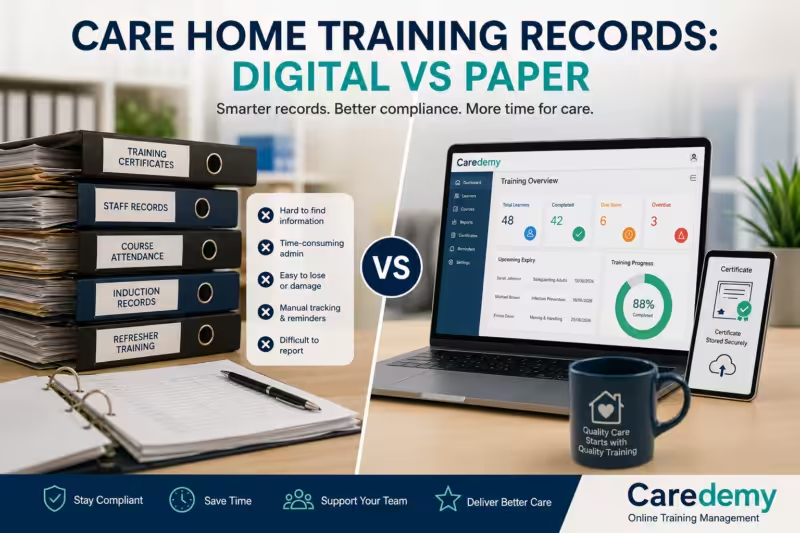
Some care homes still rely on paper folders and spreadsheets, while others have moved to dedicated digital learning management systems (LMS). Each approach has advantages, but as care teams grow and training requirements become more complex, digital systems can make training administration significantly easier.
In this guide, we compare paper folders, spreadsheets and digital LMS platforms, while looking at some of the features that can make care home training records easier to manage, monitor and report.
What Are Care Home Training Records?
Care home training records are documents or digital records showing the training and development completed by members of staff.
Depending on the care setting and role, records may include:
- Mandatory training completed by employees
- Course titles and completion dates
- Certificates
- Training expiry or renewal dates
- Refresher training requirements
- Staff attendance records
- Training relevant to particular job roles
- Learning and development activity
- Outstanding or overdue training
Training records can help managers demonstrate that staff have received appropriate training and that learning requirements are being monitored.
Skills for Care’s Adult Social Care Workforce Data Set (ASC-WDS) also provides functionality for recording training and qualifications, identifying missing mandatory training and generating reports that can support evidence during inspections.
Good record keeping is therefore not simply about having a certificate in a folder. It is about having an organised system that allows managers to understand the current training position across their workforce.
Paper Folders: The Traditional Approach
For many care homes, paper folders have traditionally been the simplest way to keep staff training records.
A manager might have an individual personnel or training folder for every employee containing:
- Training certificates
- Course attendance sheets
- Induction records
- Competency assessments
- Training plans
- Refresher training information
- Copies of relevant qualifications
Advantages of paper records
Paper records are straightforward and do not require specialist software. A small care home with a relatively small workforce may find it easy to keep certificates and training documents in labelled folders.
They can also be useful where a physical document needs to be reviewed or signed.
The disadvantages
The problem becomes more apparent as the workforce grows.
Paper folders can be:
- Time-consuming to update
- Difficult to search
- Vulnerable to loss or damage
- Dependent on manual filing
- Difficult to monitor across a whole team
- Prone to outdated information
- Harder to use when preparing reports
A manager may have to work through multiple folders to find out who has completed a particular course or whose training is approaching renewal.
Physical records also need appropriate security and protection. The Information Commissioner’s Office (ICO) advises organisations to store personal information securely and to protect records against loss, damage or unlawful or accidental destruction.
For this reason, paper may work for some individual documents, but relying entirely on paper can make workforce training management unnecessarily labour-intensive.
Spreadsheets: A Step Towards Digital Records
Spreadsheets are often the next step for care homes moving away from paper.
A simple spreadsheet might contain columns such as:
| Staff member | Course | Completed | Expiry date | Certificate | Status |
|---|---|---|---|---|---|
| Employee 1 | Safeguarding Adults | 12/03/2026 | 12/03/2027 | Yes | Current |
| Employee 2 | Infection Prevention | 20/04/2026 | 20/04/2027 | Yes | Current |
| Employee 3 | Fire Safety | 05/05/2025 | 05/05/2026 | Yes | Renewal due |
Spreadsheets can provide a useful overview and are considerably easier to search than a filing cabinet.
They can also allow managers to sort staff by course, completion date or renewal date.
Where spreadsheets can become difficult
The challenge is that the spreadsheet itself does not necessarily manage the training.
Someone still needs to:
- Enter new training information.
- Update completion dates.
- Add new employees.
- Remove or archive old records appropriately.
- Check approaching expiry dates.
- Chase staff who have outstanding training.
- Store certificates separately.
- Produce reports.
- Make sure the information remains accurate.
In other words, a spreadsheet can record training, but much of the administration remains manual.
This can become particularly challenging when a care home has multiple employees completing different courses at different times.
Digital LMS: A More Structured Approach
A digital learning management system can bring training records, certificates, course completion information and reporting together in one place.
Instead of maintaining several folders or spreadsheets, managers can use an LMS to monitor learning activity across their workforce.
Depending on the system, managers may be able to see:
- Which courses staff have completed
- Which courses are outstanding
- Completion dates
- Certificates
- Training status
- Expiry or renewal dates
- Individual learner progress
- Training reports
This can make it much easier to answer a simple but important question:
“Are our staff training records up to date?”
Digital systems can also reduce the amount of repetitive administration involved in monitoring training.
Skills for Care highlights similar benefits through ASC-WDS, including alerts for missing mandatory training and notifications when training has expired or is approaching expiry. Training records can also be viewed by individual staff member or grouped by training type, with reports available for use during inspections.
What Is an Audit Trail?
An audit trail is a record showing what happened within a system and, depending on the platform, when actions or changes took place.
For training management, this can provide a clearer history of learning activity.
For example, a digital system may help you establish:
- When a learner was assigned a course
- When they started training
- When they completed it
- When their certificate was issued
- Whether training has been renewed
- What training remains outstanding
This is particularly useful when managers need to review historical training information rather than simply looking at today’s position.
An organised audit trail can also support better accountability because managers can see the progression of training rather than relying on memory or scattered paperwork.
Certificate Storage: Keeping Evidence Together
Certificates are an important part of training records because they provide evidence that a learner has completed a course.
With paper-based systems, certificates might be:
- Printed and filed
- Stored in individual staff folders
- Kept in separate training folders
- Scanned and saved on a computer
This can make retrieving a particular certificate more difficult.
A digital LMS can provide a more centralised approach by linking certificates to individual learner records.
Instead of searching through filing cabinets or folders, a manager can potentially access the relevant learner’s training history and certificate electronically.
This can save time when preparing for internal reviews, audits or inspections.
Automatic Training Reminders
One of the biggest practical advantages of digital training management is automation.
Without automated reminders, a manager may need to maintain a diary or spreadsheet and regularly check which courses are approaching their renewal date.
A digital system can help by providing reminders when training:
- Is approaching expiry
- Has expired
- Is incomplete
- Has not yet been started
- Needs to be renewed
This gives managers an opportunity to act before training becomes overdue.
It can also reduce the risk of important renewal dates being missed simply because someone forgot to check a spreadsheet.
Reporting: Turning Training Records into Useful Information
Good training records should not simply sit in a database. Managers need to be able to use the information.
Reporting tools can help answer questions such as:
- How many staff have completed mandatory training?
- Which employees have outstanding courses?
- Which training is approaching expiry?
- Which courses have the highest completion rates?
- Which members of staff require follow-up?
- What training has been completed during a particular period?
A clear report can provide a much quicker overview than manually checking individual files.
Skills for Care notes that training records and summaries can be downloaded as reports and used as evidence for inspections.
Digital Does Not Mean “Set and Forget”
Moving from paper to digital records does not remove the manager’s responsibility for good record keeping.
A digital system is only useful if the information within it is accurate and properly managed.
Managers should still have processes for:
- Adding new employees
- Assigning appropriate training
- Checking completion
- Reviewing certificates
- Monitoring renewals
- Updating staff information
- Managing leavers
- Reviewing outdated records
- Controlling access to personal information
The ICO advises organisations to establish appropriate retention arrangements and only keep personal information for as long as necessary for the relevant purpose, taking account of legal and regulatory requirements.
This is particularly important because staff training records can contain personal information.
Data Protection and Care Home Training Records
Whether records are stored on paper, in spreadsheets or within an LMS, data protection should be considered.
Training records may contain information such as:
- Employee names
- Job roles
- Training history
- Certificates
- Completion dates
- Other employment-related information
Organisations should consider who needs access to these records and how they are protected.
The ICO states that organisations should keep workers’ personal information accurate and secure and should have appropriate arrangements for retention and disposal.
For digital systems, this means considering matters such as user permissions, passwords, access controls, security and the arrangements provided by the software provider.
For paper records, it may mean locked storage and controlled access.
The important point is that moving to digital does not remove data protection responsibilities. It changes how the information is stored and managed.
Digital vs Paper: Which Is Better?
There is no single solution that will suit every care provider.
However, the differences become clearer when comparing the approaches.
| Feature | Paper folders | Spreadsheets | Digital LMS |
| Store training information | ✓ | ✓ | ✓ |
| Search records quickly | Limited | ✓ | ✓ |
| Store certificates | ✓ | Limited | ✓ |
| Automatic reminders | ✗ | Limited | ✓ |
| Training reports | Manual | ✓ | ✓ |
| Monitor outstanding training | Manual | Manual | ✓ |
| Audit trail | Limited | Limited | ✓ |
| Centralised records | Limited | ✓ | ✓ |
| Reduce administration | ✗ | Somewhat | ✓ |
The most appropriate system will depend on the size of the organisation, the number of staff, the complexity of training requirements and the resources available.
For a very small service, a well-maintained spreadsheet may be sufficient.
For larger care organisations with multiple staff members, courses and renewal dates, a dedicated digital system may provide significant advantages.
How to Improve Your Care Home Training Records
Regardless of the system you use, a few simple principles can make your training records more effective.
1. Keep one clear source of information
Avoid having essential information spread across several unrelated folders and files wherever possible.
A central record makes it easier to establish the current training position.
2. Record completion dates
Knowing that a staff member has completed training is useful, but recording when it was completed makes the information much more meaningful.
3. Track renewal requirements
Where training needs to be refreshed, record the relevant review or renewal date and have a process for monitoring it.
4. Keep certificates accessible
Make sure certificates can be retrieved when they are needed rather than being stored somewhere that is difficult to access.
5. Review records regularly
Do not wait until an inspection or audit to discover that information is missing or out of date.
Regular reviews can identify gaps earlier.
6. Use reporting to identify gaps
Reports can help managers move from simply storing information to actively managing staff development.
7. Protect personal information
Make sure access to training records is appropriate and that records are securely stored, retained and disposed of in line with your organisation’s policies and applicable requirements.
Preparing for an Inspection
Good training records can make it easier to demonstrate how your organisation manages staff learning and development.
A manager should be able to quickly establish:
- What training staff have completed
- What training is mandatory for particular roles
- Whether required training is up to date
- Which staff need refresher training
- Where certificates or other evidence are held
- What action is being taken when training is outstanding
Good record keeping is also broader than training alone. Skills for Care’s guidance on adult safeguarding identifies training, supervision and appraisal among important records and emphasises that records should be clear, secure and accessible to those who need them.
A well-organised training management process can therefore support wider workforce governance and quality assurance.
Making the Move from Paper to Digital
If your care home currently relies on paper folders or spreadsheets, moving to digital does not have to happen overnight.
Start by reviewing your existing process.
Ask:
Where are our records currently stored?
Identify every location where training information is kept.
What information do we actually need?
Remove unnecessary duplication and establish which records need to be maintained.
Who is responsible for updating records?
Clear responsibility helps prevent gaps.
How are renewal dates monitored?
If this currently depends on someone’s diary or memory, consider whether automated reminders could improve the process.
How quickly can we produce a training report?
If producing a simple report takes hours, there may be an opportunity to improve the system.
Can certificates be found easily?
If managers regularly struggle to locate certificates, centralised digital storage may save considerable administrative time.
The Future of Care Home Training Records
Care providers are increasingly using digital tools to manage workforce information, learning and development.
The aim is not simply to replace a filing cabinet with a computer.
The real benefit is creating a training management process that is easier to monitor, update and report.
Digital records can help managers move from reactive administration — checking folders when something is needed — towards proactive management, where upcoming training requirements and gaps can be identified earlier.
For care homes with growing teams, multiple training requirements and regular renewal dates, this can make a noticeable difference to day-to-day administration.
Final Thoughts
Effective care home training records are about much more than storing certificates.
Paper folders can work for smaller teams, while spreadsheets offer a useful step towards digital record keeping. However, a dedicated digital LMS can bring training information, certificates, reminders, audit trails and reporting together in one place.
Whatever system you choose, the fundamental principles remain the same: keep records accurate, secure, accessible and up to date, and make sure your organisation has a clear process for monitoring staff training.
Caredemy offers online training management, helping care providers deliver and manage online learning for their teams.
If you are looking for online training solutions for your care organisation, explore the courses and training options available from Caredemy.
Learn more at caredemy.co.uk.