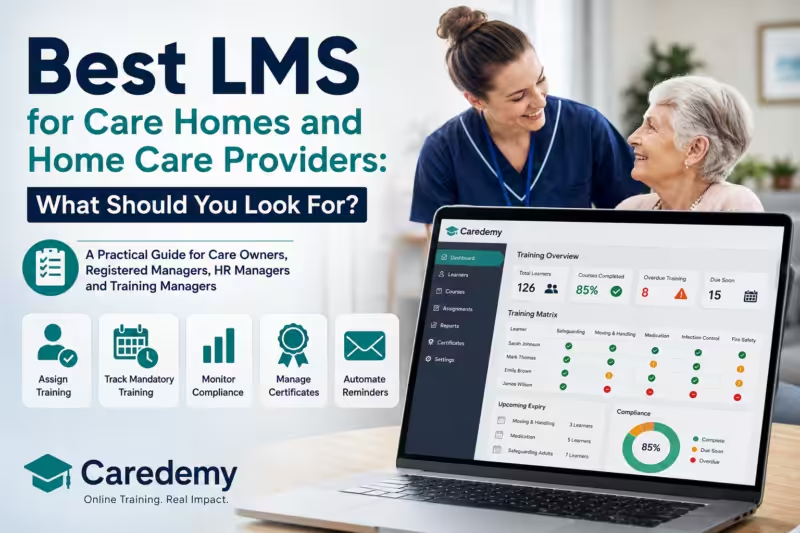
Best LMS for Care Homes and Home Care Providers: What Should You Look For?
A Practical Guide to Choosing the Right Care Training LMS
Quick answer: The best LMS for a care provider is one that does more than deliver online courses. It should help managers assign training, track mandatory and refresher training, manage certificates, identify compliance gaps, monitor expiry dates and produce clear evidence for audits and CQC inspections.
There is no single LMS that is best for every care organisation. A small home care agency with 10 employees has very different requirements from a multi-site care group employing 500 people.
The right system depends on:
- Number of learners
- Number of services or locations
- Staff turnover
- Mandatory training requirements
- Care Certificate requirements
- Frequency of refresher training
- Reporting requirements
- Number of managers who need access
- Whether you need to record external or face-to-face training
- How much administration you want the system to automate
- Your training budget
For most established care providers, the key question should therefore not be simply “Which provider has the cheapest courses?”
A better question is:
“Which care training LMS will make it easiest for us to keep our workforce appropriately trained and demonstrate that when required?”
This guide explains what care homes, home care agencies and other care organisations should look for when comparing learning management systems and online staff training platforms in 2026.
Why Does a Care Provider Need an LMS?
A Learning Management System (LMS) is software used to organise, deliver, track and report staff learning.
For a care provider, that can include everything from allocating safeguarding training to identifying employees whose moving and handling training needs refreshing.
This matters because staff training is not simply an administrative exercise.
Under Regulation 18 of the Health and Social Care Act 2008 (Regulated Activities) Regulations 2014, providers must ensure staff receive the appropriate support, training, professional development, supervision and appraisal necessary to perform their roles. CQC guidance also says training and development needs should be assessed when staff start employment and reviewed at appropriate intervals.
CQC also expects providers applying to register care homes, domiciliary care agencies and supported living services to have a staff training plan identifying how training requirements will be met. The plan should reflect statutory and regulatory requirements, the Care Certificate standards and specialist needs relevant to the people being supported.
A good CQC training management system helps turn these requirements into something managers can actually monitor.
Instead of maintaining separate spreadsheets, folders, certificates and email reminders, managers can see their workforce training position from one central system.
What Should the Best LMS for Care Homes Include?
When comparing staff training software for care homes or home care providers, look beyond the number of courses available.
The management functionality can be just as important as the course library.
1. Course Assignment
Managers should be able to assign courses to individual employees and ideally allocate training to multiple learners at once.
Bulk assignment becomes particularly important as organisations grow.
For example, assigning infection prevention and control training individually to 100 employees creates unnecessary administration. A good LMS should allow managers to select the relevant staff and assign training in bulk.
Look for:
- Individual course assignment
- Bulk assignment
- Role-based assignment
- Course bundles
- Induction pathways
- Automatic or scheduled reassignment
2. Mandatory Training Management
Your LMS should make mandatory training easy to identify and monitor.
Requirements vary according to the organisation, role, workplace risks and needs of the people receiving care. CQC guidance specifically refers to statutory training, mandatory training defined by the provider and additional learning required for employees to carry out regulated activities safely.
Common care training subjects can include:
- Safeguarding adults
- Infection prevention and control
- Moving and handling
- Health and safety
- Fire safety
- Medication
- Food safety
- Mental capacity
- Equality, diversity and inclusion
- Learning disability and autism
- First aid
The LMS should help you distinguish between training that is complete, due, overdue or approaching renewal.
3. Care Certificate Management
If you recruit people who are new to care, check how the LMS handles the Care Certificate.
The Care Certificate standards were updated in March 2025. There are now 16 standards, including a standard covering awareness of learning disability and autism.
Importantly, online courses alone should not automatically be treated as completion of the entire Care Certificate.
Skills for Care states that workers need to be assessed on what they know and what they do, demonstrating that they understand and can carry out the standards in their role.
When comparing an LMS, ask:
Does the system support the current 2025 Care Certificate standards, and how does it distinguish eLearning from workplace assessment and competence?
4. Training Matrix
A training matrix is one of the most valuable features of a care training LMS.
Instead of opening individual learner records, managers should be able to see an overview showing:
| Learner | Safeguarding | Moving & Handling | Medication | Fire Safety | IPC |
|---|---|---|---|---|---|
| Employee A | Complete | Complete | Due Soon | Complete | Complete |
| Employee B | Complete | Overdue | Complete | Complete | Due Soon |
| Employee C | Complete | Complete | Complete | Complete | Complete |
Colour coding makes this even easier.
At a glance, a registered manager should be able to answer:
Who is compliant, what is outstanding and what needs attention next?
5. Expiry and Refresher Dates
Completing a course once is not the end of training management.
Some learning needs to be refreshed according to legislation, guidance, organisational policy, risk assessment or changes in an employee’s role.
Your LMS should therefore allow managers to:
- Record completion dates
- Set renewal periods
- Identify upcoming refreshers
- Flag overdue training
- Reassign training where appropriate
Without this functionality, organisations often end up maintaining a separate spreadsheet alongside their LMS — defeating much of the purpose of having one.
6. Automated Training Reminders
Chasing employees manually becomes increasingly difficult as your workforce grows.
A good LMS should automatically remind learners when training is:
Assigned → Due soon → Due → Overdue
This reduces administration for registered managers, HR teams and training managers while making individual learners more accountable for completing their training.
7. Certificate Management
Managers should not have to search email inboxes or individual employee folders every time they need a certificate.
Look for:
- Automatic certificates
- Central certificate storage
- Certificate verification
- Manager downloads
- Bulk certificate downloads
- Search and filtering
- Ability to control learner certificate access where required
Certificate administration sounds minor until you manage hundreds or thousands of course completions each year.
8. Compliance Reporting
Reporting is where an LMS starts becoming a genuine management tool.
A useful compliance dashboard should answer questions such as:
- What percentage of mandatory training is complete?
- Which learners have overdue courses?
- Which courses have the lowest completion rates?
- What expires in the next 30, 60 or 90 days?
- Which locations have compliance gaps?
- When was a course completed?
- What evidence is available?
Reports should be understandable without requiring someone to manipulate large spreadsheets manually.
9. Bulk Reporting
Once you have more than a small number of employees, bulk reporting becomes essential.
Check whether reports can be filtered by:
- Learner
- Course
- Department
- Location
- Branch
- Manager
- Completion status
- Date
- Expiry or renewal status
Also check whether data can be exported if you need to provide it to senior management, auditors or other systems.
10. Multiple Branches and Locations
A single care home may only need one management level.
A home care group operating 15 branches may need something completely different.
For multi-site organisations, look for a hierarchy such as:
Organisation → Region → Branch/Service → Manager → Learners
Regional or senior managers should ideally be able to see the organisation-wide picture while local managers see the employees they are responsible for.
11. Manager Access
One shared administrator account is rarely a good long-term solution.
Your LMS should support different management permissions.
For example:
Registered Manager: manages their service and employees.
Training Manager: oversees training across multiple services.
HR/Compliance: accesses organisation-wide records and reporting.
Senior Management: views high-level compliance.
Ask whether additional manager accounts cost extra.
12. Learner Management
Staff join, leave, change roles and move between locations.
The LMS should make these everyday tasks simple.
Managers should be able to:
- Add learners
- Disable learners
- Reset courses where appropriate
- Move learners between groups
- Update details
- Assign new training
- View training history
- Manage inactive accounts
The easier these tasks are, the less time managers spend administering training.
13. Replacing Staff and Leavers
This is particularly important in social care because workforce turnover can make per-learner licensing expensive.
Suppose you buy 50 annual licences and 10 employees leave during the year.
Can those licences be transferred to their replacements?
Some systems allow licences to be reassigned while others restrict this or charge for additional users.
Ask this question before signing the contract, not afterwards.
14. Mobile Learning
Home care employees may rarely visit an office.
A mobile-friendly LMS is therefore especially important for domiciliary care, supported living and staffing organisations.
Courses should work effectively on:
- Smartphones
- Tablets
- Laptops
- Desktop computers
Test an actual course on a phone during your trial or demo rather than relying solely on screenshots of the desktop system.
15. Audit Trails
A useful LMS should create a reliable history of learning activity.
Depending on the platform, this might include:
- Course assignment
- Start date
- Completion date
- Assessment result
- Certificate
- Renewal date
- Training status
Good records help managers demonstrate that training is being actively managed rather than simply purchased.
16. CQC Inspection Evidence
No LMS can make an organisation “CQC compliant” by itself.
Care quality depends on much more than online training.
However, a good LMS can make it significantly easier to evidence how training is managed.
CQC Regulation 18 requires appropriate training and professional development, while CQC’s training-plan guidance specifically asks providers to demonstrate how their training will support safe, effective and person-centred care.
During a demo, ask the provider:
“If CQC asked me to demonstrate our current workforce training position today, show me exactly what I would produce.”
That one question can reveal a great deal about the quality of the reporting system.
17. Support
Software is only useful if managers know how to use it.
Ask whether your package includes:
- LMS onboarding
- Manager training
- Telephone support
- Email support
- Technical support
- Dedicated account management
- Help importing learners
- Ongoing training-platform support
This becomes increasingly important for larger organisations.
18. Pricing
Compare total annual cost, not simply the advertised course price.
Care training platforms can charge through:
- Individual courses
- Course credits
- Per-learner subscriptions
- Monthly subscriptions
- Annual licences
- Unlimited training packages
- Bespoke enterprise contracts
Also ask about:
- VAT
- Setup fees
- Additional managers
- Additional courses
- Certificates
- Reports
- Replacement learners
- Support
- Contract length
- Minimum learner numbers
A £2 course is not necessarily cheaper if your organisation then spends hours every month manually administering training.
Care LMS Essential Features Checklist
Use this checklist when comparing providers or booking LMS demonstrations.
Mandatory care training library
Current Care Certificate support
Individual course assignment
Bulk course assignment
Training matrix
Colour-coded compliance status
Expiry/refresher tracking
Automated reminders
Automatic certificates
Bulk certificate downloads
Compliance reporting
Bulk reporting
Multiple branch/location management
Multiple manager accounts
Learner management
Leaver/replacement process
Mobile-friendly learning
Training history/audit trail
CQC-ready evidence/reporting
Manager onboarding
Technical support
Transparent pricing
Clear renewal terms
Ability to export data
LMS vs Simply Buying Online Courses
Not every organisation needs a sophisticated LMS.
There is an important difference between buying online training and managing workforce learning.
Buying individual online courses
This can work well when:
- You have only a few employees
- Training requirements are occasional
- Someone already maintains training records
- You only need a small number of courses
- Staff turnover is low
You purchase the course, the learner completes it and you retain the certificate.
Simple.
Using a care training LMS
An LMS becomes increasingly useful when you need to:
- Manage multiple employees
- Allocate mandatory training
- Run staff induction
- Monitor Care Certificate learning
- Schedule refresher training
- Chase outstanding courses
- Track compliance
- Manage certificates
- Produce management reports
- Manage multiple locations
- Evidence training during inspections
The tipping point differs by organisation.
For many providers, once someone is maintaining a complicated spreadsheet alongside hundreds of certificates, emails and refresher dates, the organisation has effectively created its own manual LMS.
Software can simply do that job more efficiently.
Example LMS Requirements by Type of Care Provider
Small Home Care Agency
Example: 10–20 employees
Priorities:
- Affordable pricing
- Mandatory training
- Care Certificate
- Mobile learning
- Simple training matrix
- Automated reminders
- Certificate storage
- Easy learner replacement
Avoid paying for complex enterprise functionality you are unlikely to use.
Single Care Home
Example: 30–60 employees
Priorities:
- Mandatory and specialist training
- Care Certificate
- Training matrix
- Refresher management
- Manager dashboard
- Compliance reporting
- Bulk course allocation
- Certificate management
- CQC evidence
A registered manager should be able to understand the home’s current training position quickly.
Multi-Site Care Group
Example: 5–30 services
Priorities:
- Multi-location hierarchy
- Local manager accounts
- Central oversight
- Location-based reporting
- Bulk learner management
- Automated reminders
- Organisation-wide compliance matrix
- Audit trails
- Exportable reports
- Dedicated support
The ability to compare compliance between locations becomes particularly valuable.
Healthcare Staffing Agency
Example: 100+ temporary workers
Priorities:
- Fast learner onboarding
- Mandatory healthcare training
- Bulk course assignment
- Mobile access
- Certificate verification
- Expiry monitoring
- High-volume reporting
- Easy replacement/management of inactive learners
Staff turnover and licence flexibility should be major purchasing considerations.
Organisation With 100+ Learners
At this scale, administrative efficiency can matter as much as course price.
Look for:
- Bulk everything
- Automated reminders
- Advanced filtering
- Multiple managers
- Compliance dashboards
- Branch reporting
- Exportable data
- Automated renewals
- Account management
- Scalable pricing
Ask the provider to demonstrate common tasks using 100+ learners rather than showing a demo account containing five employees.
UK Care Training LMS Comparison
The UK market includes specialist care training companies and broader learning-management platforms.
Features and pricing change, so buyers should always confirm current packages directly with providers before purchasing.
| Provider | Care-focused | LMS / Management | Training Matrix / Reporting | Care Certificate | Published Pricing |
| Caredemy | Yes | Yes | Yes | Yes | Team PAYG, credits and subscription options |
| Careskills Academy | Yes | Yes | Yes | Yes | Unlimited plans from £6.67/user/month for 5–10 staff, falling with volume |
| Social Care TV | Yes | Yes | Yes | Yes | Credits plus subscription options; individual credits advertised from £9.49 with bulk prices lower |
| eCert Training | Yes | Yes | Yes | Yes | Annual team training advertised as low as £35/learner |
| Flourish / Click | Yes | Yes | Yes | Yes | Subscription/package pricing; confirm current commercial quote |
| My Learning Cloud | Health & social care focused | Yes | Yes | Relevant care content | Tiered LMS plans; confirm current pricing |
Published information checked August 2026.
Caredemy provides a care-focused LMS alongside its course library. Team packages include learner management, compliance reporting, a colour-coded matrix, bulk course assignment and certificate downloads. Subscription packages also advertise automated course renewal and free learner replacement.
Careskills Academy advertises an automatic training matrix, reminders, compliance reporting, certificate management and the ability to record internal and external certifications. Its published unlimited pricing currently starts at £6.67 per user per month for 5–10 staff, with lower per-user rates at higher volumes.
Social Care TV offers a specialist health and social care LMS with reporting and compliance functionality. It supports credits, monthly payments and subscription licences, with subscription licences capable of being reassigned when employees leave.
eCert Training advertises a learner management system, automated reminders and CQC-focused reporting alongside 50+ CPD-accredited courses. It currently advertises annual training from as low as £35 per learner.
Flourish, formerly Grey Matter Learning, operates its Click learning platform for adult social care. Its updated LMS includes manager dashboards for compliance tracking and learning management, while the platform has long combined learning, assessment and evidence of competence.
My Learning Cloud offers a broader health and social care LMS with hierarchy management, mobile learning, certification tracking, automated notifications and multiple reporting tiers. Its enterprise offering includes multi-management control.
The comparison demonstrates why there is no universal “best LMS for care homes”. Some providers emphasise low-cost courses, others competence management, while others provide more extensive enterprise LMS functionality.
Buy according to the functionality your organisation will actually use.
How Caredemy Team Training Addresses These Requirements
For organisations considering Caredemy Team Training, the platform combines Caredemy’s 200+ course library with LMS functionality designed for organisations managing ongoing staff training.
Current Team Training functionality includes:
- 200+ CPD courses
- Learner management
- Bulk course assignment
- Colour-coded reporting matrix
- Compliance and audit reporting
- Course-time reporting
- Bulk certificate downloads
- Care Certificate training
- Mobile-friendly learning
- Text-to-speech
- Translation functionality
- Manager support
Subscription packages additionally include features such as access to the full course library, free manager courses, free learner replacement, course bundles, automated course renewal and dedicated account management.
Free learner replacement is particularly useful for care providers experiencing staff turnover because an employee leaving does not necessarily mean another full learner subscription needs to be purchased.
However, Caredemy will not be the right platform for every organisation.
Providers requiring highly customised enterprise learning environments, extensive SCORM content management, HR integrations or complex bespoke workflows should compare specialist enterprise LMS products as well.
The objective should always be to choose the system that fits your operational requirements.
15 Questions to Ask During a Care LMS Demo
Do not spend the entire demo watching the supplier’s presentation.
Ask them to demonstrate real tasks.
- Show me how I assign mandatory training to 50 employees at once.
- Show me the training matrix.
- How do I immediately identify overdue training?
- How are refresher dates managed?
- Are learners automatically reminded?
- Show me how I download certificates for multiple employees.
- How does your system support the 2025 Care Certificate standards?
- Can I manage multiple branches separately?
- Can each registered manager access only their service?
- What happens when an employee leaves?
- Can I transfer or replace their licence?
- Show me what I could produce if CQC requested our training records today.
- Can I export our training records if we leave your platform?
- What support and onboarding are included?
- What will our total annual cost be, including every fee?
The supplier’s ability to answer these questions inside the live system is more valuable than a long feature list.
Choosing the Best Care Training LMS
The best LMS for care homes and home care providers should make training management simpler, not more complicated.
For a small provider, simplicity and affordability may be the priorities.
For a growing provider, automated reminders, refresher management and reporting become increasingly important.
For a multi-site organisation, management hierarchy, branch reporting and central oversight can become essential.
Whatever your size, focus on four outcomes:
Can we train the right people?
Can we see what is outstanding?
Can we keep training up to date?
Can we demonstrate what we have done?
If an LMS does those things reliably while remaining straightforward for managers and learners to use, it is doing its job.
FAQs
What is the best LMS for care homes?
There is no single best LMS for every care home. Look for a care-focused system providing mandatory training, Care Certificate support, a training matrix, refresher tracking, automated reminders, certificate management and compliance reporting. Larger providers should also prioritise multi-site management and bulk reporting.
What is a care training LMS?
A care training LMS is a Learning Management System used to deliver, manage and track staff training within health and social care organisations. It can help managers assign courses, monitor completion, manage certificates, track refresher dates and produce compliance reports.
Do care homes need an LMS?
There is no general requirement saying every care home must purchase LMS software. However, care providers must ensure staff receive appropriate training and development. An LMS can make managing and evidencing those requirements considerably easier, particularly as the workforce grows.
Can an LMS help with CQC inspections?
Yes. A care-focused LMS can help managers produce training matrices, completion records, certificates and other evidence showing how staff learning is managed. However, an LMS itself does not guarantee CQC compliance.
What training records should care homes keep?
Providers should be able to demonstrate that employees have received training appropriate to their role and the needs of people using the service. A good LMS can maintain completion records, certificates, dates, assessment results and refresher information.
Can an LMS manage mandatory training renewals?
Yes. Many care LMS platforms allow refresher periods to be set and can identify or automatically remind learners when training needs renewing.
Does an LMS replace competency assessment?
No. Completing eLearning does not automatically demonstrate practical competence. This is particularly important for areas where workplace observation or practical assessment is required. The Care Certificate, for example, requires assessment of what workers know and what they do.
What should a home care agency look for in an LMS?
Home care providers should prioritise mobile learning, mandatory training, Care Certificate support, automated reminders, learner management, refresher tracking and straightforward reporting because employees often work remotely.
How much does a care training LMS cost?
Pricing varies considerably. Some systems use credits or pay-per-course pricing, while others charge per learner per month or year. Compare the total cost of courses, LMS functionality, certificates, replacement learners, support and administration rather than looking only at the headline course price.
Is Caredemy an LMS?
Yes. Caredemy provides a learner management system as part of its Team Training offering, alongside its online health, social care and workplace training library. Features include learner management, bulk assignment, compliance reporting, a colour-coded reporting matrix and certificate management.